STEM & Learning

Best Electronic Circuit Kits of 2026

The first afternoon with a new circuit kit is the easy part: a light blinks, a buzzer shrieks, and whoever is holding the wires looks up like they've invented electricity. Day three is where most kits fall apart — a missing resistor, a manual that stops explaining, a half-finished project that never gets finished. A good kit closes that gap, keeping the builder going past the first magic trick and into the tenth project, which is where the actual learning happens.

I've built these with my nephew at the kitchen table and solo on rainy evenings, and over the past six months my team has worked through 12 kits, from snap-together sets aimed at eight-year-olds to breadboard kits that expect a little patience with tiny parts. What separates them has almost nothing to do with part count. It's whether the instructions hold a beginner's hand, whether the pieces survive being taken apart and rebuilt, and whether the box is honest about what's inside. The ones below are what we'd hand to a curious kid or a grown-up who never got past eighth-grade science.

#1

Snap Circuits Extreme SC-750

Snap Circuits Extreme SC-750

Long-term home learning

Doodle Score 9.6/10
Check Price

Worth Noting

  • Storage insert fails long before the parts do
  • Little theory
Parts
80
Projects
750
Recommended Age
8 years and up
Computer Interface
Cable and software included
Read the full review

What separates the Extreme set from a box of switches and lamps is the instrumentation. An analog meter, a variable capacitor, a solar cell, a power amplifier, and a cable that lets you plug a finished circuit into a computer and watch the waveform on screen — those are the parts that turn assembling into measuring. With 80 modules and 750 projects, this is the kit that stops feeling like a toy somewhere around the AM radio.

We think that range is what earns the price. A child who starts at eight with the light-and-buzzer builds still has the lie detector, the adjustable light controller and the solar experiments waiting two years later, and because the same handful of modules comes back across hundreds of projects, the box keeps paying out. Nothing here needs a soldering iron or a screwdriver; the pieces click onto the grid and lift off again.

The manual does the building well and the explaining badly. The diagrams are clear, color-coded and matched to the parts, so a nine-year-old can work through a page alone. What's missing is the why: there's almost no theory on the page, and a child learns what a capacitor does by hearing the difference it makes rather than by reading an explanation. If you want the science to stick, plan to sit alongside and supply it.

One practical gripe. Eighty modules need somewhere to live, and the insert that ships with the set gives out long before the electronics do. Budget for a small compartment box and a shelf, because the loose-parts phase arrives faster than you expect and a mixed pile of modules is the quickest way to lose a resistor and an evening.

Bottom line: We recommend the Extreme set as the default for ages eight and up: 750 projects, real instruments to measure with, and no computer required unless you want one.

#2

National Geographic 120 Circuit Kit

National Geographic 120 Circuit Kit

Light and sound

Doodle Score 9.6/10
Check Price

Worth Noting

  • Wire connections are easy to knock loose
Projects
120+
Instructions
Illustrated plus video
Tools Required
None
Recommended Age
8 years and up
Read the full review

The project menu is the pitch: keyboard mode for playing tunes, a light show, a fan that lifts off, sound effects — builds chosen because something happens at the end of them. If your kid's interest in electronics is really an interest in making noise and light, this kit organises itself around that instinct rather than around a physics sequence.

Hand this to a nine- or ten-year-old who has already snapped a few circuits together and wants something that looks more like real electronics: separate components, wires that snap onto them, an illustrated manual with video support for the fiddly builds. It isn't our first choice — the Extreme set covers far more ground, and the ELEGOO kit goes deeper for less money. For a kid who wants a light show this weekend, neither of those matters much.

Bottom line: We recommend it for the kid who wants songs, lights and a flying fan more than a physics lesson, and whose family wants a kit that looks like real electronics.

#3

ELEGOO UNO R3 Super Starter Kit

ELEGOO UNO R3 Super Starter Kit

Learning to code

Doodle Score 9.4/10
Check Price

Worth Noting

  • Tutorial is a download, not a printed book
  • Setup needs more computer confidence than a beginner has
Soldering
Not required
Controller
UNO R3
Guided Lessons
22+
Read the full review

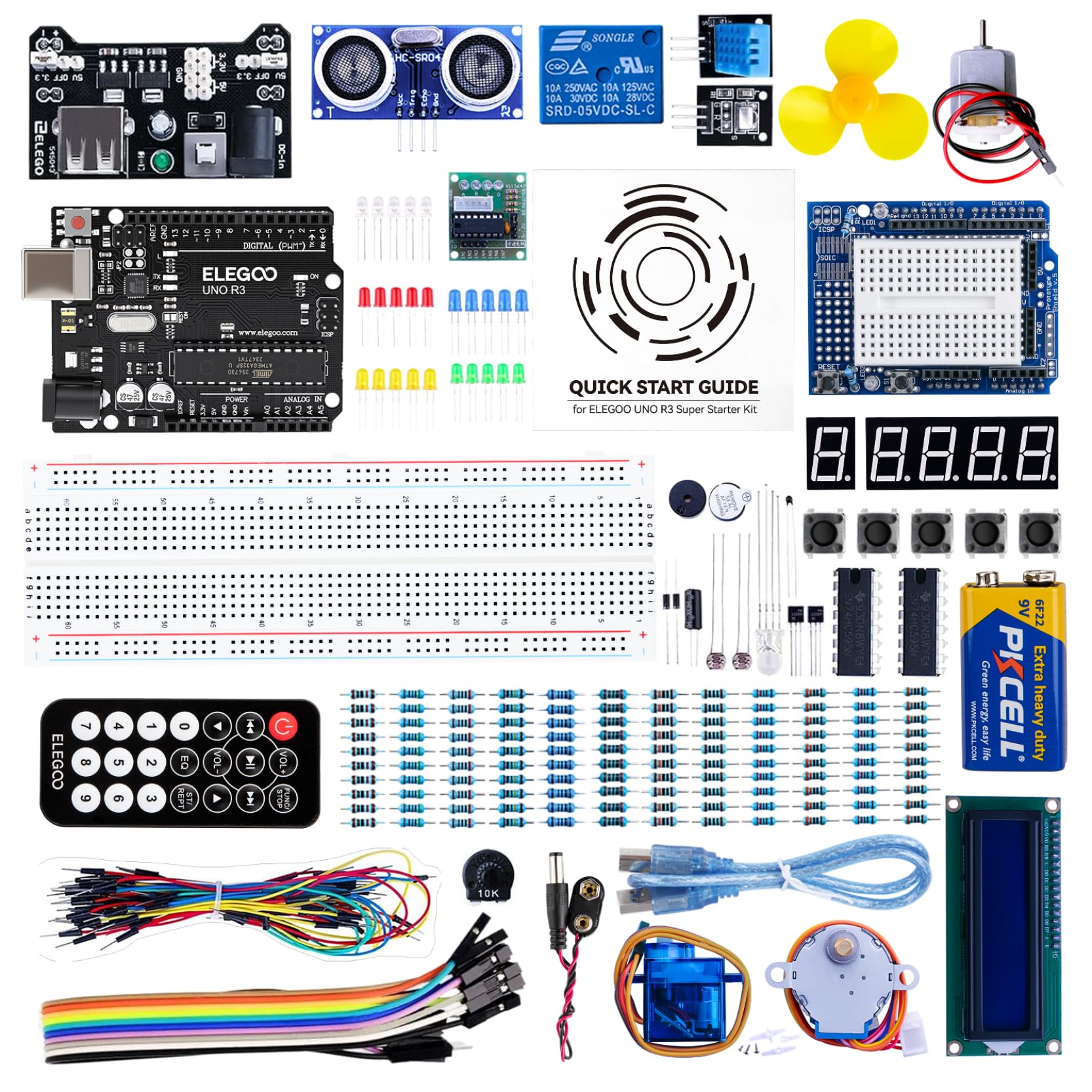
Set this beside the official Arduino kit and the arithmetic is hard to argue with: 22-plus guided lessons, an UNO R3 board, a pre-soldered LCD1602, ultrasonic and temperature sensors, a joystick, a servo, a stepper with its driver board, a relay and a 9V battery, for a fraction of what the branded kit costs. We think it's the right first Arduino purchase for most households, because what you're really buying is a cheap answer to the question of whether this will actually get used.

The lessons run on a loop that's easy to describe and satisfying to perform: wire the circuit on the breadboard, plug the board into a laptop, upload the example sketch, then change a number in the code and watch the LED blink faster. That loop is the difference between this and a snap kit — you're learning to program a thing rather than assemble one. No soldering is required, and the LCD arriving with its header already attached is a genuine kindness.

The breadboard takes a firm push to seat a wire, and the temperature sensor is the least convincing part in the box: fine for a lesson on humidity, not something to build a project around. Keep the supply at 9 volts or below, too, since the breadboard power module isn't rated for more. What you're paying for is the lesson sequence and the parts count, not the polish of every component.

Bottom line: We recommend it as the first Arduino kit for a teenager or an adult with a laptop, a free evening, and no soldering iron.

#4

Snap Circuits Beginner SCB-20

Snap Circuits Beginner SCB-20

Young beginners

Doodle Score 9.4/10
Check Price

Worth Noting

  • Small set
  • Costs more per part than larger kits
Included
Lighted color-changing fan
Tools Required
None
Recommended Age
5 to 9 years
Read the full review

Almost every kit worth buying here starts at eight, which leaves a five-year-old watching from the doorway. This is the set for that kid. The pieces are the same snap modules in a smaller, simpler assortment, the manual swaps dense diagrams for big color pictures and short instructions, and the reward for getting a circuit right is a lighted color-changing fan — a much better payoff, we think, than a buzzer. It's the one kit here built so a kindergartner can work alone after a single session with an adult, and that independence is worth more than the project count suggests.

The catch is that this is a starter in the strictest sense. The fan and the bulb holders are the parts that fail — a fan can arrive dead or quit within a few hours of play — and Snap Circuits replaces broken pieces free of charge, so a dud module doesn't end the kit. But a seven-year-old will have seen everything here inside a year, and you pay more per part than the bigger sets charge. Treat it as the first rung and plan the next kit before the birthday, not after the complaint.

Bottom line: We recommend it for a five- to seven-year-old who isn't ready for an eight-plus kit, knowing you'll be shopping for a bigger set within a year.

#5

ELEGOO Mega 2560 Complete Kit

ELEGOO Mega 2560 Complete Kit

Advanced builders

Doodle Score 9.4/10
Check Price

Worth Noting

  • Documentation assumes prior electronics experience
  • Some kits arrive missing a component
Components
200+
Guided Projects
35+
Recommended Age
13 years and up
Digital I/O Pins
54
Read the full review

Fifty-four digital pins, sixteen analog inputs and four hardware serial ports is the short version of why this kit exists. The UNO-based kits here run out of places to plug things in the moment you want a display, two sensors and a motor running together. The Mega doesn't, and 256 KB of flash means the programs can get long before the board complains.

Around 200 components come with it, and the list is unusually interesting: an RFID reader, a real-time clock, a PIR motion sensor, a water-level sensor, a keypad, a joystick, a rotary encoder, a relay and an 8x8 LED matrix on a MAX7219 driver. There's also a proper storage case and a small-parts box, which matters more than it sounds once you've lived with 200 loose components in a bag.

The tutorials are the weak link. Thirty-five-plus guided projects with example code will get you blinking, sensing and moving things, but the documentation assumes more background than a beginner brings, and the jump from where the wire goes to why the code reads it isn't bridged. Plan on a video course running alongside the manual.

That's why we point this at the teenager or adult who has already finished a starter kit and knows they want more inputs and a bigger board, rather than at a first-timer. The thirteen-and-up recommendation is honest: nothing in the box is hazardous, but 200 components and 54 pins reward someone who labels things and puts them away.

Bottom line: We recommend it as a second kit for someone who has outgrown an UNO board and wants more pins, more sensors and a case to keep them in.

#6

Science Kidz 188 Experiments

Science Kidz 188 Experiments

Budget snap builds

Doodle Score 9.4/10
Check Price

Worth Noting

  • Little headroom once a child turns ten
Manual
Illustrated color
Projects
188
Tools Required
None
Read the full review

On the box it's the value play: 188 projects, snap-together modules, a color manual, no tools, and a stated age range that starts at five. It's the same shape of kit as the Snap Circuits sets — color-coded modules and a picture-led manual — from a smaller brand, sitting at the bottom of the price range.

The age band is the interesting part. Five is unusually young for a set with this many projects, which puts it in direct competition with the Snap Circuits Beginner kit: you get far more builds here for a bit more money, but the manual asks a child to follow a numbered diagram rather than match a picture. Budget for it as a self-contained purchase rather than as an add-on to a Snap Circuits collection.

Our read is that it works as a second kit for a household that already knows snap circuits get played with, or a low-risk first one for a six- or seven-year-old who has outgrown the simplest sets. What it won't do is grow with them: a ten-year-old who starts asking why a circuit works, or who wants to program something, has run past what this box offers.

Bottom line: We recommend it as a volume buy — lots of builds for the money — for a family that already knows snap kits get used.

#7

REXQualis UNO R3 Starter Kit

REXQualis UNO R3 Starter Kit

Cheap Arduino start

Doodle Score 9.4/10
Check Price

Worth Noting

  • Tutorial is a PDF download only
  • Some units arrive with a dead component
Power
9V 1A adapter included
Tutorial
PDF download
Controller
UNO R3 compatible
Read the full review

The 9-volt wall adapter included in the box is the detail we noticed first. Budget Arduino kits usually leave you to run the board off a battery or buy an adapter separately, and a board that sags halfway through a lesson is how a beginner loses an evening to a fault that isn't theirs. Here it's in the box.

The rest is a familiar UNO R3-compatible board with the usual supporting cast: an LCD1602 with its header already soldered, servo and stepper motors with the ULN2003 driver board, an assortment of sensors, and the small pile of components every tutorial needs. Two details we appreciated — every part arrives individually bagged and labeled, and the plastic box is roomy enough to keep using after the first week.

Where it trails the ELEGOO kit is the teaching. The tutorial is a PDF download and the documentation is thinner, so the lessons explain what to connect more reliably than why, and a component that arrives dead means diagnosing it from a datasheet. Buy this one when the budget is the constraint and there's an adult comfortable with troubleshooting; buy the ELEGOO when you want the lessons to carry a beginner.

Bottom line: We recommend it when the budget is tight and an adult is around to troubleshoot: the included adapter and labeled parts are worth more than the thinner manual costs.

#8

Arduino Starter Kit K000007

Arduino Starter Kit K000007

Structured curriculum

Doodle Score 9.2/10
Check Price

Worth Noting

  • Basic breadboard for the money
  • Fewer components than cheaper Arduino kits
Included
DC motor, servo, tilt sensor, LEDs
Components
Genuine Arduino parts
Project Book
Printed, English edition
Read the full review

The book is the product here. A printed, English-language project book walks you from a single blinking LED through a dozen builds, introducing one idea at a time and explaining the code beside the circuit diagram rather than dumping it in an appendix. If you've watched a kid bounce off a downloaded PDF, the difference is obvious the moment the book lands on the table.

The parts are genuine Arduino, sourced in Italy, and the selection is deliberately conservative: a board, a breadboard, LEDs, a DC motor, a servo, a tilt sensor and the small components the projects call for. Nothing in the box is exotic, and that's the point — every part has a job in the book, so nothing sits in the tray being mysterious.

Where it loses ground, we think, is value. The breadboard is basic for what this costs, and the kit asks a premium over the ELEGOO set, which throws in more sensors and more lessons. What the extra money buys is the curriculum and the genuine board: a course you can hand to a motivated twelve-year-old. If breadth for the money is the goal, the ELEGOO wins; this is the one for a household that wants a proper textbook.

Bottom line: We recommend it when the book matters more than the parts count: a structured, printed course for a motivated beginner with a laptop.

How We Tested a Dozen Circuit Kits

Over six months we narrowed a shortlist of roughly 40 kits down to 12, filtering by price, age range, and whether the box contained everything needed to finish the first project without a trip to the hardware store. Each kit landed at a different house, which meant different tables, different kids, and different amounts of adult hovering.

The first hour with every kit is a parts audit. We counted each resistor, LED, wire, and connector against the printed manifest before building anything, and noted whether the kit threw in spares or offered a way to order a replacement for whatever was missing. Then we built — at the kitchen table after school, on a rainy Saturday when the screens were off, and at a birthday party where the box was opened in front of six kids. We timed how long the first project took and watched whether the builder needed an adult every 30 seconds or could read the manual and keep going on their own.

Instructions got the hardest look, because they decide whether a kit is educational or just fiddly. We compared diagrams, checked whether the steps explained why the circuit worked rather than just where to push the wire, and handed the manual to a 10-year-old to see what happened next. Quality surfaced later: whether snap connectors still gripped after the fifth rebuild, whether breadboard components bent or snapped, whether a finished project survived being carried across the room. Value came down to how many projects we genuinely finished before the parts or the ideas ran out.

How to Choose Electronic Circuit Kits

Snap-together kits or Arduino kits?

These are two different hobbies wearing similar packaging. A snap kit gives you color-coded modules that click onto a grid: no computer, no code, no soldering, and a working circuit in five minutes. An Arduino kit gives you a board, a breadboard, loose components and example programs — you wire it, plug it into a laptop, upload code, and then work out why nothing happened.

The deciding question is whether the child has regular access to a computer they're allowed to use. Without one, an Arduino kit is a box of parts. With one, and with a kid who wants to make things move and respond, it's the interest that lasts longer. We also refuse to compare project counts across the two families: 750 snap projects and 35 Arduino lessons aren't the same unit, because a snap build can take ten minutes and an Arduino lesson can take an evening.

Match the kit to the child, not the box

Age ratings on these kits are minimums for building without close supervision, not ceilings. The range runs from five, through the eight-plus band most kits sit in, to thirteen for the biggest Arduino set. A seven-year-old can usually work a five-to-nine beginner kit alone after one session with an adult; an eight-year-old who takes things apart will get more from an eight-plus kit than a twelve-year-old who has never built anything.

Two practical checks before you buy. Count how many pieces a child has to hold at once, because a breadboard demands finer motor control than a snap grid. And decide up front whether you're the helper — the first session decides whether the kit comes out again, and it goes better with an adult at the table.

Read the manual before you buy the kit

Instructions decide whether a kit gets used twice or fifty times, and they're the one thing you can't judge from a photograph of the box. Check two things: whether the manual is printed or a download, and whether it explains as well as illustrates. A printed book matters for a child building on the floor; a PDF is fine for an adult at a laptop.

The weakness in most of the manuals here is theory. They show you where the parts go and what should happen, then stop. If you want the child to come away knowing why a capacitor changes a sound, plan to supply that explanation yourself, or pay for a kit whose project book actually teaches.

Parts, storage and the second purchase

Component count tells you more than project count. A kit with 80 modules can support 750 builds because the same parts come back in different arrangements, while a kit with 200 components supports bigger, longer projects. Either way, ask whether the parts are a standard system you can expand — a kit whose pieces only work with themselves is a closed purchase.

Then plan for the mess. These sets arrive in boxes whose inserts give out long before the electronics do, and a spill of 200 components is a lost weekend. A compartment box is the best accessory you can add, and it costs less than the replacement parts you won't have to buy.

Frequently Asked Questions

Final Verdict

If you want one kit to buy and be done, the Snap Circuits Extreme SC-750 is the one we recommend: it's the broadest kit here, it needs no computer, and the meter, solar cell and interface give it room to keep going after the picture-diagram stage.

Two honest alternatives. If there's a laptop in the house and an interest in code, the ELEGOO UNO R3 kit teaches more per dollar than anything else on this page. And if the child is five or six, start with the Snap Circuits Beginner and accept that you're buying a stepping stone rather than a destination.