STEM & Learning

Best Coding Toys for Kids of 2026

Most coding toys look great in the box and lose their shine by the second weekend. The robot gets built, the first program runs, the lights blink, and then the pieces land in a bin somewhere and the tablet goes back to something shinier. The kits that survive that honeymoon are the ones that fold the learning into the play, so a kid is debugging a loop without ever noticing they're learning anything. That's what I went looking for over the past six months, with 14 coding toys and a rotating crew of kids between five and ten, including my own two, who are merciless critics.

The nervousness around this category is real on both sides: the cheap kits mostly teach tapping buttons in sequence, and the ambitious ones seem to want a grown-up on the floor for an hour. What separates them isn't price. It's whether the instructions alone got my nine-year-old building without me, whether the app paired on the first try and stayed paired, and whether the thing survived being dropped, sat on, and stuffed into a tote bag. The picks below are the ones still living on the rug.

#1

Apitor Robot J

Apitor Robot J

Building-minded kids

Doodle Score 9.4/10
Check Price

Worth Noting

  • Only one model can be built at a time
  • 480 pieces need sorting and storage
Models
6-in-1
Coding App
Icon-based app
Building Pieces
480 blocks
Recommended Age
7 to 12 years
Read the full review

Apitor Robot J arrives as 480 blocks, two motors, and a control module, and it asks the child to build the robot before coding it. There are six models to work through, from a walking-style robot to one that performs 360-degree stunts. The app uses icon-based coding, so a builder who is still reading slowly can drag a loop or a variable into place without typing.

The building is the point. A ready-to-run robot gets a child to a result in minutes; this kit gets them to a result they made. We think that trade is worth it for a 7-to-12-year-old who already likes Lego-style sets. It also means the kit asks for more table space and patience than a robot that arrives assembled.

We recommend it as the builder's alternative to Dash or Botley. It has less of a track record than the classroom robots here, but the combination of construction and icon coding is hard to match for the right kid. If your child asks how the robot is made, start here.

Bottom line: Apitor's 480-block kit is the pick for builders who want to code a robot they assembled themselves, with six models to work through.
#2

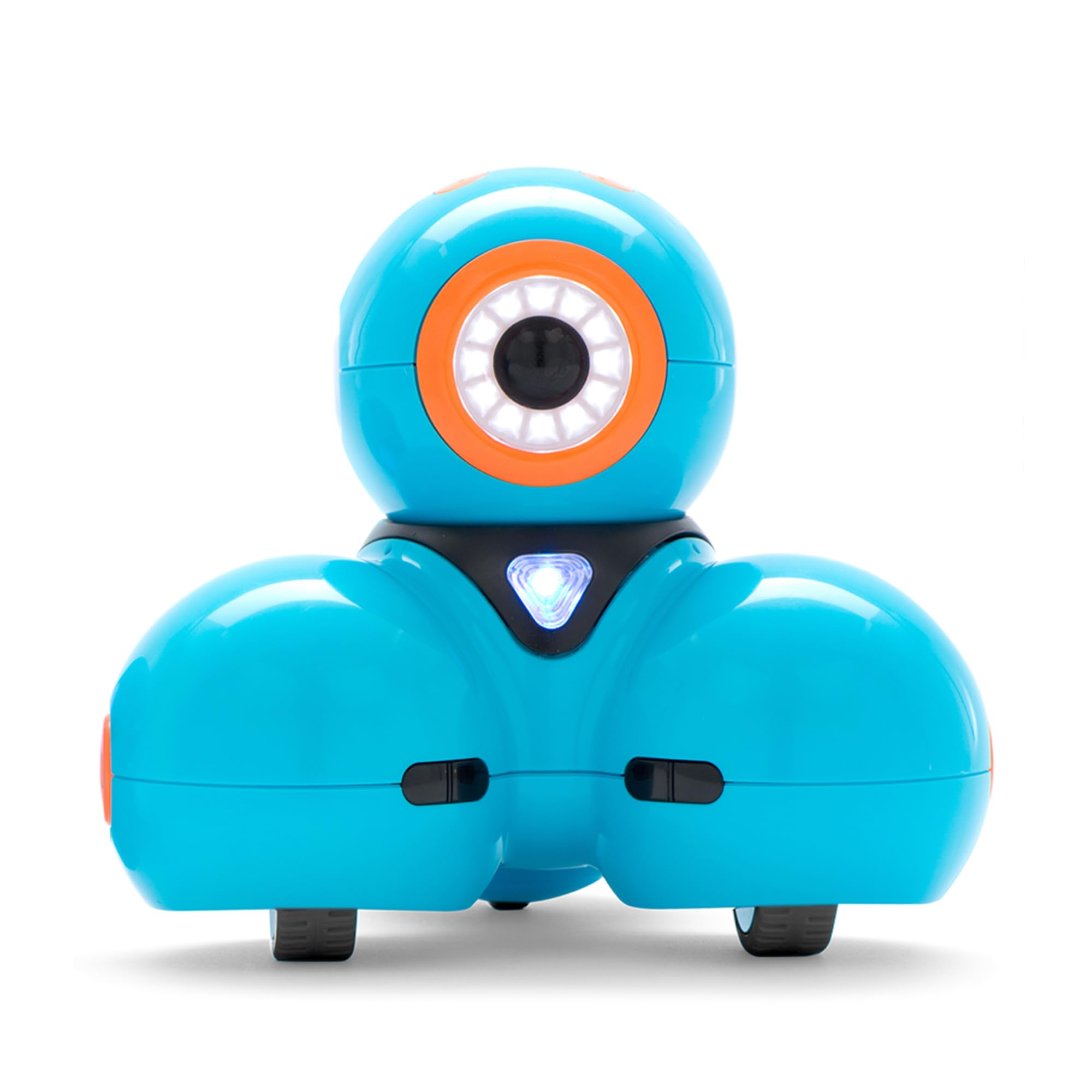
Wonder Workshop Dash

Wonder Workshop Dash

Growing coders

Doodle Score 9.2/10
Check Price

Worth Noting

  • Requires a compatible tablet or phone
Battery
Rechargeable
Coding Apps
Blockly, Wonder, Path
Recommended Age
6 years and up
Building Connectors
2 included
Read the full review

Dash is the coding toy we recommend first for most families with a child in the 6-to-11 range. The reason is the ladder: kids can start with simple command blocks in the Wonder app, move to path-based puzzles, then use Blockly for loops, variables, and longer sequences. That progression is what separates Dash from a toy that teaches one sequence and stops. It earns the top spot because it can stay in the routine for more than a season.

The hardware supports that plan. Dash is rechargeable, has two building brick connectors for Lego-style add-ons, and responds to voice commands. It does not have a camera, so this is not the pick for video projects; the appeal is movement, sound, and programmable behavior. We found the block menu easier to explain than a text editor, and the built-in challenges give a kid a reason to keep opening the app.

Setup is about as simple as an app robot gets: charge it, install the app, pair, and go. The trade-off is that the coding lives behind a screen. If you want the whole lesson to happen on the floor, Botley is the better fit. If you want the deepest block-coding path in this group, Dash is worth the premium.

One small detail we appreciated: the two building brick connectors let Dash carry a sensor or a paper cup, which turns a coding lesson into a tiny engineering project. That is the kind of open-ended use that keeps a robot from being a one-trick demo.

Bottom line: For families who want a coding toy that grows with a child, Dash is the one we recommend: Blockly projects and five apps turn simple commands into real programming.

#3

Botley the Coding Robot

Botley the Coding Robot

Screen-free coding

Doodle Score 9.2/10
Check Price

Worth Noting

  • Forward command can be finicky
Set Size
77 pieces
Batteries
5 AAA required
Coding Format
Screen-free remote
Recommended Age
5 years and up
Read the full review

Botley is the coding toy for the family that does not want another tablet in the toy bin. Kids press commands on the remote programmer, then watch the robot carry out the sequence on the floor. The set includes 40 coding cards, six double-sided tiles, and 27 obstacle pieces, so the coding is physical from the start: lay out a path, plan the turns, and press go. For a 5- or 6-year-old, that is a cleaner introduction than an app with a login screen.

We think the 77-piece activity set is the reason to choose this version over a bare robot. The cards give a child a way to plan before pressing buttons, and the tiles and obstacles turn the living room into a maze. It is still sequencing, not block coding with variables, so a 9-year-old may be ready for Dash. For the early years, the no-screen loop is the feature that matters.

The practical catch is power: Botley needs five AAA batteries and a Phillips screwdriver before first play. Put those on the table when the box is opened, or the first session becomes a scavenger hunt. The remote is simple enough for small hands, and the robot's lights and sounds make the result easy to read.

Bottom line: Botley is our pick for families who want coding without a screen: kids sequence commands on the remote and watch them play out on the floor.

#4

Sphero Mini

Sphero Mini

Compact active play

Doodle Score 9.2/10
Check Price

Worth Noting

  • Shell can crack with rough play
Size
1.57 inches
Power
Rechargeable
Coding App
Sphero Edu
Recommended Age
8 years and up
Read the full review

Sphero Mini is the size of a ping-pong ball, and that is the whole pitch: a programmable robot that can roll under a chair, fit in a backpack, and turn a coffee table into an arcade. The Sphero Edu app supports draw coding, drag-and-drop blocks, and text, while the Play app adds joystick, slingshot, and game-controller modes. It is a coding toy that hides the lesson inside recess.

We like it best as a second robot or a travel toy. It is small enough that a kid can carry it to a restaurant and roll it on the table, and the game-controller mode gives siblings something to do together. The size cuts both ways: it is easy to lose, and the little ball takes more abuse than a full-size robot. The app is the teacher here, so a child who needs hands-on pieces may click better with Botley.

For ages 8 and up, the draw-and-block coding path is a genuine step beyond remote control. The gyroscope and accelerometer make the ball feel responsive, and the LED colors give feedback without a screen lecture. It is not the only coding toy we recommend for a young beginner, but it is the one that fits in a pocket.

Bottom line: Sphero Mini is the coding toy we reach for when space is tight: it rolls, plays games, and teaches sequencing through a tiny app-controlled ball.

#5

ELEGOO UNO R3 Robot Car

ELEGOO UNO R3 Robot Car

Teens and Arduino

Doodle Score 9.0/10
Check Price

Worth Noting

  • Text-based coding only
Power
Rechargeable
Camera
FPV camera
Programming
Arduino IDE
Recommended Age
12 years and up
Read the full review

The ELEGOO car is the project we point to when a kid has outgrown sequencing and wants to see what code does to hardware. You build the car, wire the UNO R3 board, camera, motors, and sensors, then program it in the Arduino IDE. The keyed connectors help prevent some wiring mistakes, and the example programs give a starting point. This is a 12-and-up kit, and that age rating is doing real work: younger kids will need an adult nearby.

What makes it worth the bench space is the combination of driving and coding. The car can follow lines, avoid obstacles, and stream FPV video through the app, so a successful program produces something visible. It is not a magic wand; expect to debug. We think that is part of the appeal for a teenager, and a reason to keep it away from a child who wants a robot that works in five minutes.

We recommend it as the step-up pick, not the first coding toy. Dash or Botley build the habit of sequencing; ELEGOO adds wiring, sensors, and text code. If your child already tinkers with electronics, this is the one that feels like a real workshop project rather than a toy with a coding mode.

Bottom line: For a teenager ready to wire, code, and debug, the ELEGOO car kit is the most substantial coding project here.

#6

Coding Critters Scamper & Sneaker

Coding Critters Scamper & Sneaker

Preschool first coding

Doodle Score 9.0/10
Check Price

Worth Noting

  • Basic for kids past early elementary
Includes
Coding storybook
Set Size
22-piece playset
Coding Format
Screen-free buttons
Recommended Age
4 years and up
Read the full review

Scamper & Sneaker is a coding toy dressed as a pet. The set includes a robot cat, a kitten, a 22-piece playset, directional coding cards, and a storybook that gives the child a reason to plan a path. Kids press commands on the cat itself, then watch Scamper move through the story. For a 4-year-old, that story frame is the difference between a lesson and play.

We like it for the youngest coders because there is no remote to lose and no app to pair. The story frame keeps the first sessions gentle, and it leaves room for a more capable robot later. If your child is already reading directions and building mazes, Botley gives them more to grow into.

The cat's controls are on its body, which makes the first session intuitive: press forward, press turn, press go. The storybook gives parents a script for the first few plays. After that, the child needs to invent new mazes to keep it interesting. If you want a screen-free first step for a 4- or 5-year-old, this is the one we hand over with the book.

Bottom line: For a preschooler's first coding toy, Scamper & Sneaker turns a storybook and a pet robot into a gentle, screen-free introduction.

How We Picked and Tested Coding Toys

We started with a shortlist of about 40 kits sold by major retailers, compared specs and stated age ranges, and crossed off anything that required a subscription to perform the main activity, anything with no printed instructions, and anything whose version of coding amounted to pressing buttons in a fixed order. Prices ran from well under $40 to roughly $150, and we bought every unit at retail rather than accepting samples.

Fourteen kits came home and stayed for six months, living where toys actually live: the living room rug after school, the kitchen table on weekend mornings, and one long car ride apiece. Kids were five, seven, and nine, and two adults did the first build solo with a stopwatch running, working only from the printed instructions.

At every stage we watched instead of helping. We clocked how long the first build took, noted the minute a kid first asked for an adult, checked whether the companion app paired on the first attempt or needed a restart, and counted how many play sessions each kit got before someone drifted away. Durability got judged the honest way: dropped from table height, sat on, shoved into a backpack. We also weighed what the money buys, because a $100 kit that yields one build and a $50 kit that yields a year of builds are not the same purchase.

How to Choose Coding Toys for Kids

Start with the coding style

Coding toys teach different things. A screen-free sequencer like Botley or Coding Critters asks a child to plan a path and press commands in order; a block-based app like Dash or Sphero Mini adds loops, variables, and visual feedback; an Arduino kit like ELEGOO moves into wiring and text code. The right first step is the one your child can run without an adult translating every command.

Use the age rating as a starting point, not a guarantee. A 5-year-old who is still learning to read will get more from a remote and cards than from a block editor; a 10-year-old who has used Scratch may be ready for loops and variables. If you are unsure, choose the simpler system and let the child graduate.

Decide how much screen you want

Screen-free toys keep the coding on the floor, which is a real advantage for families trying to limit tablet time. App-based robots give more visual feedback and more complex projects, but they depend on a compatible device and a working app. The trap is assuming any tablet will do: check the maker's device list before buying, especially if you are using an older tablet.

If you want no screen at all, Botley and Coding Critters are the direct choices. If your child learns well from animation and sound, Dash and Sphero Mini make the screen part of the lesson rather than a distraction.

Choose ready-to-run or build-it-yourself

A ready-to-run robot gets a child coding in minutes. A building kit adds construction, which can be the best part for a child who already likes Lego-style sets, but it also adds time, small parts, and the need for table space. Apitor Robot J is the building-first option here; ELEGOO is the full workshop project for an older kid.

For a first coding toy, especially for a child under 8, ready-to-run is usually the kinder introduction. For a builder who wants to know how the robot works, choose the kit and plan the first session as a shared project rather than a solo gift.

Budget for the whole routine

The toy is only part of the setup. Botley needs five AAA batteries and a Phillips screwdriver before first play; Dash, Sphero Mini, and ELEGOO charge by USB; a 480-piece kit needs a bin or sorting tray. None of that is difficult, but it changes whether the gift works five minutes after wrapping.

Buy the batteries and a small storage container at the same time, and check whether the box includes a charging cable. A coding toy that is ready to go on day one gets used more than one that waits for a hardware store run.

Frequently Asked Questions

Final Verdict

Dash is our default because it gives a child room to grow: the first projects are simple, and Blockly adds loops and variables when they are ready. For families who want no tablet in the mix, Botley is the better buy, and its card-and-remote system is easier for a 5-year-old to run alone.

If your child is already asking how circuits and code fit together, the ELEGOO car is the project that answers the question. The right choice is the one that matches the child in front of you, not the one with the longest feature list.