STEM & Learning

Best Coding Robots for Kids of 2026

The pitch is irresistible: a robot that teaches your kid to code while they think they're just playing. The reality in plenty of homes is a plastic rover that gets three enthusiastic afternoons and then lives on a shelf next to the forgotten ukulele. What separates the two is rarely the price — it's whether the robot is genuinely fun before it's educational, and whether a seven-year-old can get it running without an adult reading the instructions aloud.

Over the past six months I've had 14 of these on my kitchen table, my living room floor, and in front of a rotating cast of kids between six and eleven — including one birthday party that turned into an accidental stress test. The pattern was clear: the robots kids return to on their own are the ones that show a result fast, then layer in loops, sensors, and conditions once the novelty of movement wears off. A robot that only drives when you steer it is a remote-control car with a story. The picks below survived both the drop test and the boredom test.

#1

Apitor Robot J

Apitor Robot J

Rebuildable kit

Doodle Score 9.4/10
Check Price

Worth Noting

  • Rebuilding means dismantling the finished model
Models
6
Pieces
480
Coding Style
Icon-based block app
Recommended Age
7 - 12 years
Read the full review

Six builds out of one box is the pitch, and Apitor delivers it with 480 blocks and a single control module running two motors. The first model walks, turns and pulls 360-degree stunts; take it apart and the same parts become something else. That rebuild is the difference between a kit that is finished in a weekend and one that gets revisited.

The coding was friendlier than we expected. The Apitor Kit app uses an icon-based block interface rather than Scratch-style text, so a seven-year-old who is still sounding out words can build loops and variables by dragging pictures around. Four control modes — dual-motor, single-motor, gyro and path — give a child several ways in before the coding starts, and the lively LED eyes and posable hands make the thing feel alive enough to program for.

The one thing we cannot vouch for is a year of rebuilds; treat the control module as the part to look after. What the design gets right is the age band: icon coding keeps a seven-year-old in the game, and six models keep a twelve-year-old from declaring it done. For the child who takes finished models apart anyway, that is the right shape of toy.

Bottom line: Apitor is the one we recommend for a seven- to twelve-year-old who builds as happily as they code, because six models keep producing new machines.
#2

Wonder Workshop Dash

Wonder Workshop Dash

Ages 6-11

Doodle Score 9.2/10
Check Price

Worth Noting

  • All play runs through a tablet or phone
  • Some units stop responding to commands
Apps
Five, including Blockly, Wonder and Path
Battery
Rechargeable, USB charging cord
Coding Style
Block-based (Blockly)
Recommended Age
6 years and up
Read the full review

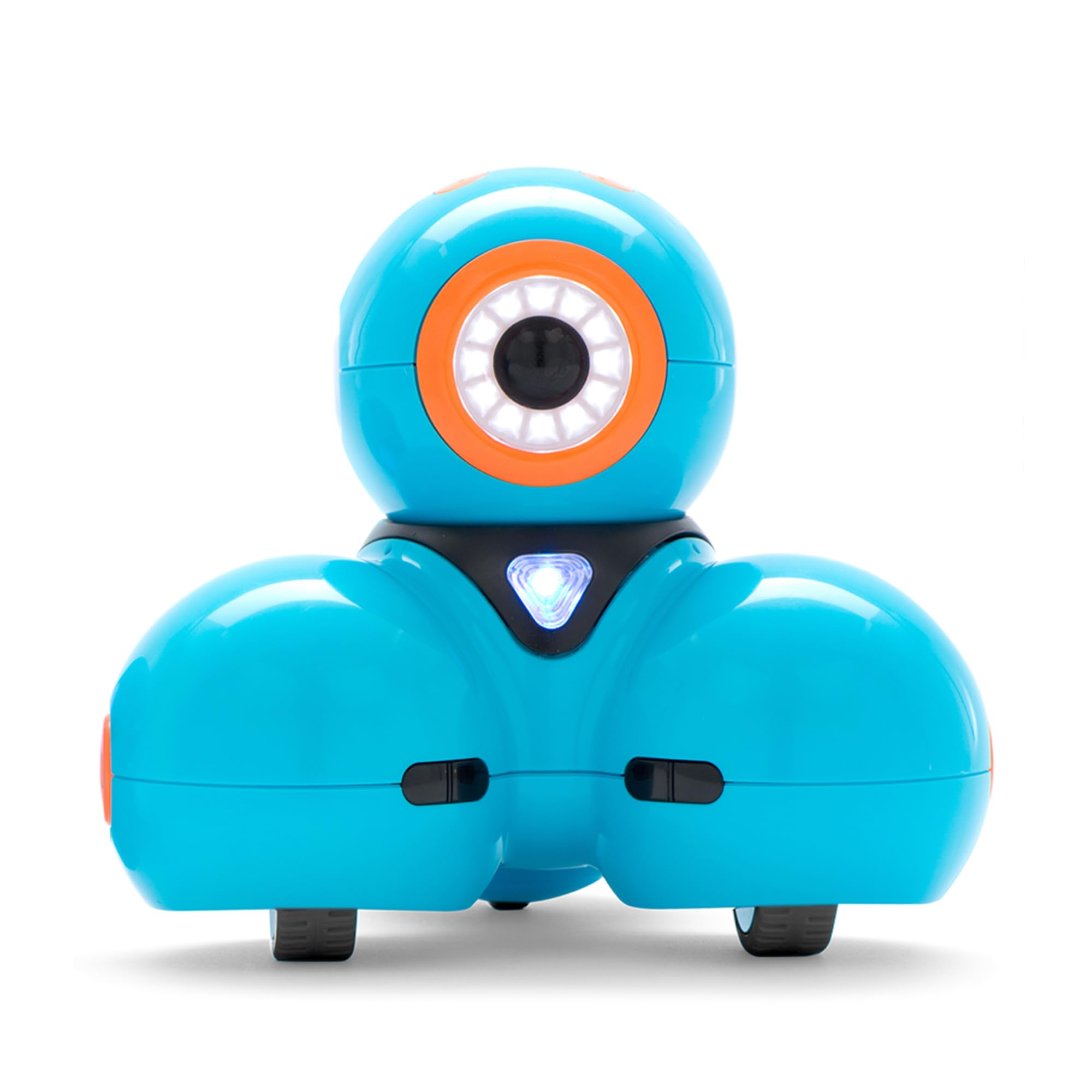
Six is young for a robot that asks you to think in loops, and bridging that gap is what Dash does better than anything else here. It arrives assembled, charges over USB, and the app library starts with Path, where a child draws a route on a screen and watches the robot follow it. From there the same machine opens up in Blockly and then in open-ended Wonder projects, so the robot a first grader drives around the kitchen still has somewhere to go at nine.

Depth is why we put it first. Sequencing, loops and variables are all things the Blockly app lets a child build and then watch happen in front of them, and that loop of plan-and-see is what separates a coding robot from a remote-control toy. We also came around to the personality: Dash sings, dances, dodges obstacles and takes voice commands, and the silliness is what buys the time for the coding. A robot that is only educational gets played with twice. The two building-brick connectors on its back get more use than they look like they will, because a child can build a body onto Dash and then program it to carry the thing around.

The catch is what you are paying for. Dash is the premium pick here and the money goes on the app ecosystem, not on premium hardware — it is plastic, it is not especially rugged, and it is strictly an indoor toy. Even so, six to eleven is a long stretch in a child's life, and the five apps are the reason the same robot can stay on the shelf that long.

Bottom line: Dash is the coding robot we point most families to: a six-year-old can draw a path, a nine-year-old can build in Blockly, and the premium buys the apps rather than tough hardware.

#3

Learning Resources Botley

Learning Resources Botley

Screen-free starter

Doodle Score 9.2/10
Check Price

Worth Noting

  • Five AAA batteries not included
  • Remote can ignore the forward command
Pieces
77
Batteries
5 AAA, not included
Coding Style
Screen-free remote programmer
Recommended Age
5 - 16 years
Read the full review

If the tablet is the thing you are trying to pry your child away from, Botley is the robot on your side. There is no app and no pairing: a palm-sized remote programmer with arrow buttons holds a sequence of moves, and the robot runs them. A five-year-old can press forward, forward, turn, go, and watch the plan travel across the kitchen floor.

The 77 pieces are what turn that into a curriculum. With the robot come 40 coding cards, six double-sided tiles, 27 obstacle pieces and a starter guide of challenges, and we rate the cards above anything else in the box: laying the plan out on the floor before pressing a button is the part that teaches planning, and it gives a parent something to point at when the sequence goes wrong. Botley also senses obstacles and follows black lines, so the mazes get harder without new hardware.

Screen-free is also the ceiling. There is no blocks-and-loops environment here, so once a child is eight or nine and comfortable with a tablet, Dash teaches more for longer. Below that, we think Botley is the better first robot of the two: the remote is physical, the feedback is immediate, and nothing needs pairing or charging before play — which on a birthday morning is worth more than it sounds.

Bottom line: We think Botley is the best first coding robot for a five- or six-year-old, especially in a house that would rather not hand over a tablet.

#4

Sphero Mini

Sphero Mini

Budget starter

Doodle Score 9.2/10
Check Price

Worth Noting

  • Shell can pop open after a knock
  • Easy to lose
Size
1.57 in ball
In The Box
3 mini cones, 6 bowling pins
Coding Style
Draw, blocks and text
Recommended Age
8 years and up
Read the full review

Small is the whole story with Sphero Mini, in both directions. At 1.57 inches it is the robot here that will actually travel — a coat pocket, a restaurant table, a hotel room — and it is also the one most likely to end up under the sofa, because it moves faster than something that size has any right to. We think it is the best value in this set as a first taste of coding, provided nobody in the house is precious about losing small objects.

The ladder in the free Sphero Edu app is why it earns a place rather than being a novelty. A child starts by drawing a path on screen with a finger, moves to drag-and-drop blocks, and can end up writing code in the same app. Getting from joystick driving to making the ball trace a square is a short hop, and the three mini cones and six bowling pins in the box turn the exercise into a game.

The shell is the weak point. It is a hard plastic ball that can pop open when it takes a knock, and it is small enough that the money feels steep next to a building kit that fills a bigger box. Neither bothers us much for what this is — a robot small enough to carry is a robot that gets used on a rainy Tuesday — but it stays out of a rough four-year-old's hands.

Bottom line: Sphero Mini is the smallest robot here and the easiest to justify: real draw-to-JavaScript coding in something that fits in a pocket.

#5

ELEGOO UNO R3 Robot Car

ELEGOO UNO R3 Robot Car

Teen programmers

Doodle Score 9.0/10
Check Price

Worth Noting

  • App pairing over Wi-Fi can fail
  • An evening of assembly before the first drive
Sensors
Camera, line-tracking, ultrasonic
Programming
Arduino IDE
Control Board
ELEGOO UNO R3
Recommended Age
12 years and up
Read the full review

This is the kit for the kid who has done blocks and wants to type something. ELEGOO's car is an UNO R3 board, motors, an ultrasonic sensor and a camera module bolted to acrylic plates, and you program it in the Arduino IDE — pin numbers, delays, and the particular frustration of watching a robot drift in a slow curve when you asked for a straight line.

We think that frustration is the point, and it is why the car earns a runner-up spot despite being the least toy-like thing on this page. Keyed connectors cut down the wiring mistakes that sink these kits for beginners, the illustrated tutorial and example programs give a working baseline to modify, and the payoff is visible: FPV video through the app, line tracking, obstacle avoidance. A twelve-year-old who finishes this has programmed a machine, not sequenced one.

Twelve-plus is the right label. The acrylic plates, the exposed board and the debugging all assume a child who can slow down, and a frustrated nine-year-old hands the laptop to a parent quickly. Below that age this becomes an adult's project with a child watching; above it, it is the most substantial thing here.

Bottom line: If your teenager wants to write real code and drive the result, ELEGOO's Arduino car is the most substantial kit here for 12 and up.

#6

okk 635-Piece Robot

okk 635-Piece Robot

Big brick build

Doodle Score 8.8/10
Check Price

Worth Noting

  • Remote needs two AAA batteries, not included
  • Coding limited to programmed movement paths
Pieces
635
Battery
Rechargeable lithium battery
Control
2.4 GHz remote and app
Recommended Age
6 - 12 years
Read the full review

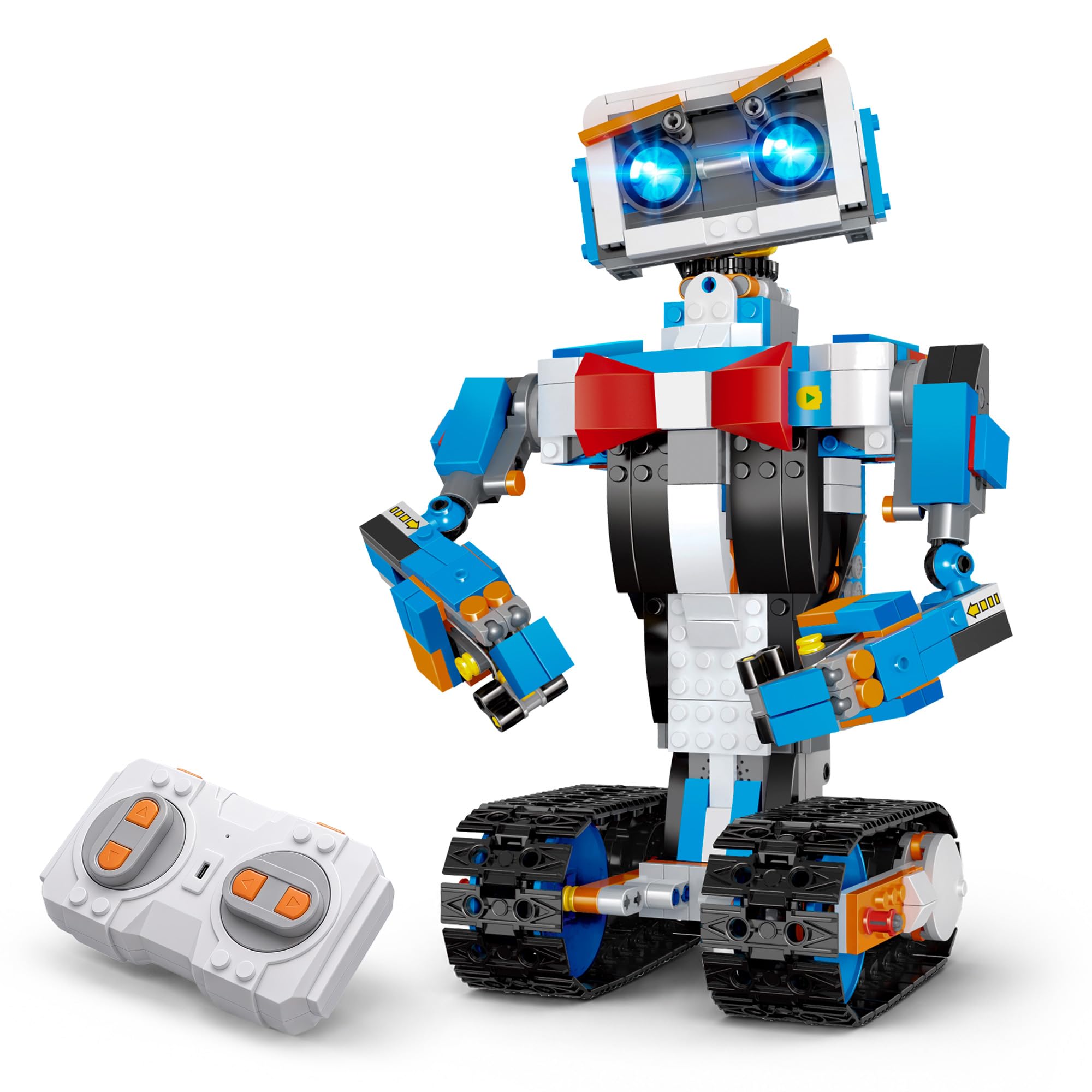
Six hundred and thirty-five pieces is a statement of intent, and we rate the okk robot as a building project that happens to drive. Our first session went on the tracks and the head; the payoff arrives when the arms and eyebrows go on and the thing has a face you can pose before each run.

The remote is the part that works best. It is a 2.4 GHz unit with enough range for a hallway, it drives forward and back, spins the robot 360 degrees and raises the tracks, and it needs no pairing ritual to get going. The app adds programmed movement paths, which is the coding component, and it is the weaker half: Bluetooth pairing is the step that goes wrong, and a programmed route is a short hop from ordinary driving rather than a coding course.

Where it lands for us is as a first big build for a child who is more maker than programmer. The posing and the driving carry the play; the coding is a garnish. If you want the opposite balance — a build where the programming is the main event — the Apitor set is the closer fit, and the ELEGOO car goes further still for a teenager. What the okk gives you that neither does is scale.

Bottom line: Buy the okk kit for a young builder who wants a robot with presence; it drives well on the remote and treats coding as a bonus.

How We Tested 14 Coding Robots With Actual Kids

The shortlist started with one rule: it had to involve writing a program, not just steering a joystick. From there we filtered by age range, price, and whether the companion app runs on the tablets families already own, which cut the field roughly in half. Fourteen robots made the cut, from screen-free button-and-card bots to block-coding kits with a hundred small pieces.

Testing happened where these things actually live: kitchen tables on Saturday mornings, the living room rug after school, and one sleepover where four kids passed three robots around for two hours. Each robot was unboxed and assembled by a kid with an adult nearby but not helping, and we timed the build and noted the exact step where the instructions lost them.

Every session began with pairing. We recorded whether the app found the robot on the first try, what happened when the connection dropped mid-program, and whether it recovered without a factory reset. Then we watched how fast a kid got from box to a first moving program, and later whether they could add a loop or a sensor trigger without asking an adult.

Fun we counted rather than judged: minutes of self-directed play per session, and whether anyone asked for that robot again the next day. Units were dropped off the table, driven into walls, and packed into bins between sessions; we compared claimed battery life to real run time and checked at month six whether the pieces still snapped together. Value came down to how much a kid could do with the robot in month one versus month five.

How to Choose Coding Robots for Kids

Screen-Free or App-Based?

The first fork is whether the coding happens on a tablet. A screen-free robot such as Botley uses a remote programmer, and that is exactly why a five-year-old can use one alone: press the arrows, watch the result, adjust. App-based robots — Dash, Sphero Mini, the Apitor kit — add draw-a-path, block coding and eventually typed code, but they also add a device to charge, pair and hand over.

The trap is buying screen-free for a nine-year-old who is already comfortable in Scratch, because the ceiling arrives fast. Our rule: screen-free below seven, app-based from seven up, unless the real point of the purchase is less screen time.

Match the Coding to the Reading Level

Coding robots climb the same ladder: draw a path, drag blocks, then type. Drawing suits a child who is still learning to read because the plan is a picture. Blocks add loops and variables, and icon-based apps stretch that down to seven-year-olds who are not fluent readers yet. Typed code — an Arduino IDE, say — assumes a child who can hold a syntax error in their head, and bought for an eight-year-old it usually becomes a parent's project.

Buy one rung below what you think your child can handle, not two above. A robot that runs the plan they imagined is what keeps them coming back; one that refuses to compile is what sends them back to the sofa.

Build It or Unbox It

Assembly is the second trade. A ready-to-run robot gets played with on the first afternoon. A kit buys mechanical understanding — how a motor, a wheel and a sensor add up to movement — and costs an evening, sometimes two, with a real chance the build stalls halfway. Kits running to hundreds of pieces are their own hobby; the finished robot is the reward rather than the point.

If nobody in the house enjoys the assembly, pay for the assembled robot. If a child asks how the gears work, the kit is the better gift even at half the playtime in week one.

The Second-Week Problem

Most coding robots get abandoned for the same reason: friction. A model that has to be rebuilt before every new idea, a robot that needs re-pairing each session, a bin of loose pieces with no tray — all of it competes with a child's attention. Favor a set with somewhere to put the parts, a rechargeable battery instead of a cupboard of AAAs, and a first activity that takes minutes rather than a setup ritual.

Rebuildable kits are the exception worth knowing about: for the right child, taking the model apart is the activity, not the obstacle.

Frequently Asked Questions

Final Verdict

Dash is the pick we stand behind for most families. It is the one robot here that a six-year-old can start on and a ten-year-old can still learn from, and the app ladder — draw, blocks, then open projects — is what makes that possible. If there is no tablet to spare, Botley does the early sequencing work without one. If the child in question is already thirteen and writing code at school, the ELEGOO car is the better use of the money.